Latest Posts

Showing posts with label CELL PHONE HACKS. Show all posts

How to call Mobile phone From pc Unlimited FREE AL OVER IN WORLDWIDE


How to call Mobile phone From pc Unlimited FREE AL OVER IN WORLDWIDE
Hi guys.I am here with a new tutorial for you. I know that each and everybody wants to call for free. With most VoIP services, you can make unlimited free phone calls anywhere but only under one condition. The condition is that you can only talk for a certain time, like 10 seconds or so, or you need to be calling someone on the same service.In this tutorial i am going to showyou how to make free world widephone calls and talk as long as you like.
 Lets start:
YOU WILL NEED JAVA INSTALLED IN YOUR PC. IF YOU NOT HAVE JAVA DOWNLOAD FROM HERE
THEN First of all download FriendCaller from Here
After it is fully installed, open friend caller from desktop. Then register. check email and verify account otherwise you will be notable to call though you have free credits.


Then go to your email and confirmyour account and you will be credited $ 0.10 for free calls. So you can only call for 10 seconds for free but this what I made thistut so you can call free.Now login with your account.

Then click on the phone icon. 
Now comes the great part.
Download a software called Cheat Engine from Here
Run the software and click on “Open Process” 
Then click on window list. 
Then Select friend caller, and open it. 
Now dial number in
friend caller. [First test your own number] and click call. 
It will start ringing…
Now in Cheat Engine, enable speedhack. Edit speed to 0.00
Now enjoy your call. The timer will freeze. You can talk as much as you want. When youfinish call, you will be only charged 0.02 but after your balance is finished, make new account and enjoy

Leave a Comment Read More›

How to call your friends with their own number


Mobile hack to call your friends:


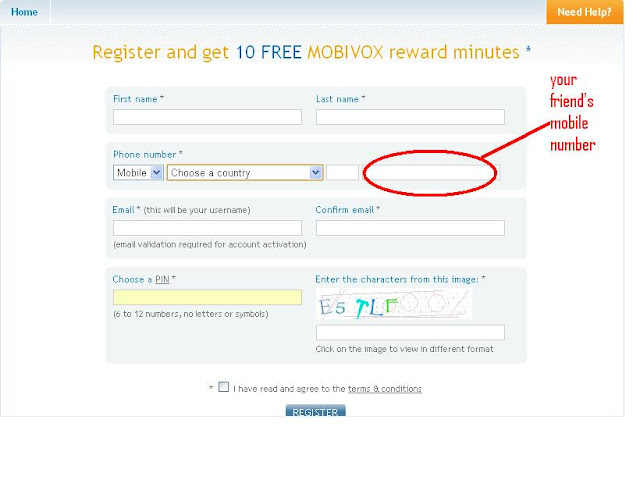
1. Go to http://www.mobivox.com and register there for free account.

2. During registration, remember to insert Victim mobile number in "Phone number" field as shown below.


3. Complete registration and confirm your email id and then login to your account. Click on "Direct WebCall".


4. You will arrive at page shown below. In "Enter a number" box, select your country and also any mobile number(you can enter yours). Now, simply hit on "Call Now" button to call your friend with his own number.


5. That's it. Your friend will be shocked to see his own number calling him. I have spent last two days simply playing this cool mobile hack prank.

That All The Full Tutorial . I think have Enjoyed It reading and Well Understood What to do?
Enjoy and have Fun.
1 comment Read More›

How to Track lost cell Phone


Track lost Mobile Phone
Now a days each one of us carry Mobile devices and always fear that it may be stolen. Did you ever lost your mobile and found no help from police or mobile operator in tracking your mobile?
Well now you don’t need to be worried about it. Each mobile carries a unique IMEI number which can be used to track your mobile anywhere in the world.

How It Works ?

1. Dial *#06# from your mobile.
2. Your mobile shows a unique 15 digit .
3. Note down this number. As this is the number which will help trace your mobile in case of a theft.
4. Once stolen you just have to mail this 15 digit IMEI number to cop@vsnl.net
5. Your Mobile will be traced within next 24 hrs. via a complex system of GPRS and internet.
6. You will find the exact geological location even if your number  is changed.

How to track?

If you’ve lost your mobile, just send an e-mail to cop@vsnl.net with the following info.
Your Name:               ____________________________________
Address:                    ____________________________________
Phone Model:          ____________________________________
Last used Number:  ____________________________________
E-mail:                       _____________________________________
Missed date:             _____________________________________
IMEI Number:            _____________________________________
Leave a Comment Read More›

Trick On How To Hide Text In Images (Steganography)


Trick On How To Hide Text In Images (Steganography)
It is widely claimed that the trick of hiding text into images (Steganography) has been used by Al Qaeda for communication for carrying out 911 attacks.Well if you also want such a strong security in your communication so that nobody else can interpret your messages except the desired person then we have a free solution for you.
By using this trick your text will get hidden into any image of your choice without increasing its size or without reducing its quality.Your data will be encrypted in the image with RC_4 encryption plus SHA hashing.So ,there is no need to worry that it can be easily cracked by anybody.
Here is the tutorial with Trick On How To Hide Text In Images (Steganography) for free
First download imagehide software.Its a freeware utility for hiding text in an image.Click here to download Imagehide
The interface of Imagehide is very simple .Once it is installed all you have to do is to load the image in which you want to hide your text (Steganography) type the text and hit theWrite data option.You can also password protect the text so that it can only be opened with the help of a password.
imagehidehidingtextmess Trick On How To Hide Text In Images (Steganography)
Once you have completed the above steps then you can send the image to your friend and he/she can only open it with the imagehide software and the password that you have used.Once opened with imagehide the text can be read by your friend.So use Steganography for more secure communication.
The imagehide is freeware and supports all windows like windows 7,windows vista and windows xp
Leave a Comment Read More›

Trick To Make Free Call to Any Number In World with movibox


Trick To Make Free Call to Any Number In World with movibox
Well this is not any hack of mobile services but instead a legitimate way of making a free call to any number in world.This can be a real helpful if you do not have any account balance in your mobile and you need to make a urgent call.This is the right time movibox can help you out.
So  what you will get with this service.
You will get free calling time of 5 minutes and you can call with it  anywhere in world to any mobile number.To make a call click on Direct call Button after you register a account with them.
Can you Make unlimited calls?
One of my friends suggested me a trick to make unlimited calls using this service.
What’s the Trick?
Well the trick is quite simple one..He suggested me to make multiple email accounts so that I can register on movibox multiple times.This trick worked for me around 5 to 6 times and I think they have figured out this method and Now my account gets automatically blocked when I create a new account.
BTW, I was not creating multiple email accounts instead I was using my gmail trick of multiple account.It worked like charm for 5-6 times and I guess they have figured this out.
What are the Mistakes That I could have made?
Well If you want to try the above trick..Please donot make following mistakes
  1. Donot make multiple movibox accounts quikly because then you can be easily figured out!
  2. Clear your cache and cookies before registering new Account.
  3. Donot use same mobile number everytime..use fake one at the time of registertion and change it later after succesful login into your account.
  4. Disconnect and reconnect your internet before registering new account as it will change your Ip address if you have dyanmic Ip address.
Do comment and tell me whether this trick is working or not for you people..In the meantime I will try to figure another way out.
Note:-If after you enter your details and click on register button and it takes too long to load then just go to homepage again and click on  Register for free..You will automatically get confermation code at your earlier entered email address
Note:-The purpose of this article is to make companies and developers aware about these type of loopholes.This is purely for educational purpose.

Leave a Comment Read More›

How to Spoof Caller ID – Caller ID Spoofing


Caller ID SpoofingCaller ID spoofing is the act of making the telephone network to display any desired (Fake) number on the recipient’s Caller ID display unit instead of the original number. The Caller ID spoofing can make a call appear to have come from any phone number that the caller wishes.
Have you ever wondered how to perform Caller ID spoofing? Read on to know more information on how to spoof Caller ID.
Unlike what most people think, an incoming call may not be from the number that is displayed on the Caller ID display unit. Because of the high trust that the people have in the Caller ID system, it is possible for the caller to easily fool them and make them believe that the number displayed on the Caller ID display is real. This is all possible through Caller ID spoofing.
 

How to Spoof Caller ID?

 
You can easily spoof any Caller ID using services like SpoofCard. In order to use the spoofcard service, you need to pay in advance and obtain a PIN (Personal Identification Number) which grants access to make a call using the Caller ID spoofing service. Once you have purchased the service, you will be given access to login to your SpoofCard account. To begin with, you need to call the number given by SpoofCard and enter the PIN. Now you will be given access to enter the number you wish to call and the number you wish to appear as the Caller ID.
Once you select the options and initiate the calling process, the call is bridged and the person on the other end receives your call. The receiver would normally assume that the call was coming from a different phone number ie: the spoofed number chosen by you - thus tricking the receiver into thinking that the call was coming from a different individual or organization than the caller’s. In this way, it becomes just a cakewalk to spoof Caller ID and trick the receiver on the other end. Thus, you neither need to be a computer expert nor have any technical knowledge to spoof caller ID. For more information on SpoofCard service visit the following link.
 
SpoofCard - Caller ID Spoofing Service

How Caller ID Spoofing works?

 
Caller ID spoofing is done through various methods and using different technologies. The most commonly used technologies to spoof Caller ID is VOIP (Voice Over IP) andPRI (Primary Rate Interface) lines.
Today most VOIP systems provide an option for it’s users to enter whatever number they want in the calling party field and this number is sent out when they make a call. Hence it is easily possible for any user to spoof Caller ID provided they have a VOIP system and know how to properly configure it to spoof the Caller ID. However sites like SpoofCard provide an easy and cheap spoofing services for those who aren’t using VOIP systems that they can configure themselves.
Caller ID spoofing is possible and being performed right from the days Called ID system was introduced. However most people are unaware of the fact that it is possible to spoof  Caller ID and make any number to be displayed on the receiver’s end. In the past, Caller ID spoofing service was mostly used by telemarketers, collection agencies, law-enforcement officials, and private investigators. But today, it is available to any Internet user who wish to spoof caller ID.
Leave a Comment Read More›

How to Trace Mobile Numbers


Trace Mobile NumbersWith the rapid growth of mobile phone usage in recent years, we have often observed that the mobile phone has become a part of many illegal and criminal activities. So in most cases, tracing the mobile number becomes a vital part of the investigation process. Also sometimes we just want to trace a mobile number for reasons like annoying prank calls, blackmails, unknown number in a missed call list or similar.
Even though it is not possible to trace the number back to the caller, it is possible to trace it to the location of the caller and also find the network operator. Just have a look at this page on tracing Indian mobile numbers from Wikipedia. Using the information provided on this page, it is possible to certainly trace any mobile number from India and find out the location (state/city) and network operator (mobile operator) of the caller. All you need for this is only the first 4-digit of the mobile number. In this Wiki page you will find all the mobile number series listed in a nice tabular column where they are categorized based on mobile operator and the zone (state/city). This Wiki page is updated regularly so as to provide up-to-date information on newly added mobile number series and operators. I have used this page many a time and have never been disappointed.
If you would like to use a simpler interface where in you can just enter the target mobile number and trace the desired details, you can try this link from Numbering Plans. Using this link, you can trace any number in the world.
By using the information in this article, you can only know “where” the call is from and not “who” the caller is. Only the mobile operator is able to tell you ”who” the caller is. So if you’re in an emergency and need to find out the actual person behind the call, I would recommend that you file a complaint and take the help of police. I hope this information has helped you!
Leave a Comment Read More›

How to Hack Symbian S60 Phones to Install Unsigned Applications


Hack Symbian S60 PhonesIf you own a Nokia Symbian S60 phone, you will most likely be aware of the fact that it is not possible to install applications on it unless they are signed using a valid certificate. Have you been trying to install applications on your S60 3rd or 5th edition phone but ending up getting a certificate error? At times, this can be really annoying; but here is a smart solution to this problem!
Here in this post, I will show you how to hack your Symbian S60 3rd or 5th edition smartphone, so as to modify the phone’s firmware and completely bypass the mandatory signing requirement. So, once you are done with this one time hack, you should be able to install any compatible application including unsigned and those with an expired certificate.
 
What is the Need for Signing Applications?
From the 3rd edition onwards, all the Symbian S60 applications need to be signed in order to ensure their integrity, so that it would not be possible for a third party to tamper with the application. Also, signing ensures that you always install applications from a trusted source.
However, there are many freeware and beta applications that come unsigned as the developers cannot afford to buy a symbian certificate. Hence, it can be a real nightmare for the users who need to install such applications on their phones. So, here is a step-by-step procedure to hack your phone and permanently disable this security feature.
 
1. Download HelloOX2 V2.03 or the latest version from the HelloOX2 Ofiicial Website.
HelloOX2 is an excellent tool to hack Symbian S60 3rd, 5th and Symbian^3 smartphones which makes it possible to install a root certificate by gaining full access to the phone’s system files. With this capability, you can install anything you want on your phones without the need to worry about the annoying certificate error!
2. The signed version of HelloOX2 demands for a donation and hence, only the unsigned version is available for free download. So, if you have the unsigned version, you need to sign it before installing on your phone. In order to sign any application, you need to have the certificate and the key file which can be obtained as follows:
  • Go to the OPDA Website, get registered and login to your account.
  • Click on the “Apply Certificate” tab, enter the model number and the IMEI of your phone and then click on “Submit and Upload” button.
  • It will usually take up 24 hours for your certificate and key file to be generated and uploaded. To check the status of your certificate click on “My Certificate” tab. If the certificate is ready for the download you will see something as follows:
OPDA Certificate Status


  • Download the certificate and the key file on to your computer. Also download the SisSigner tool to sign your HelloOX2 application.
  • Open the SisSigner, load the HelloOX2.sis, certificate and the key file as shown below and click on “Sign”. Leave the “Key File Password” field blank.
SisSigner


  • Your HelloOX2 application is now signed and ready for the installation.
3. Install the signed HelloOX2 application on your phone and run it to start the hacking process, which is completely automatic. Within a minute your phone will be hacked. Once this is done, say goodbye to the annoying certificate error and install any application.
I hope you like this post. Express your opinion through comments. Enjoy!!!
Leave a Comment Read More›

LATEST AIRTEL FAKE CHEATS HACKS MOBILE OFFICE

Recently Airtel has launched its 3G services in Bangalore/Bengaluru,Coimbatore & Tamilnadu.As like previously 2G GPRS tricks,the final Airtel 3G loop hole has been leaked.

The Main loop hole of this trick is you can get 3G speed in 2G GPRS Mobile Office Inetrnet pack cost.I think now you are able to understand Airtel 3G trick:-


If you are not able to understand this hack then follow the procedure given below:-

1.Activate the 3G on your airtel number by sending an SMS as 3G to 121.After you sent the message another message arrives and it asks for conformation.

2.Now you need to confirm the subscription by just replying the message as 1.Within few hours your 3G service will be activated.

3.After the activation of your 3G service just recharge your Account with normal 2G GPRS pack.for example if you Recharge with rs95 GPRS MOBILE OFFICE pack you will get 2G data usage with 1 month validity.

4.Now go to Network Settings option and change your Network Mode from GSM to UMTS..

5.Now you have successfully activated free 3G service on your Airtel Mobile.Enjoy high Speed browsing and downloading with Airtel.If you like this post kindly subscribe to feedburner email subscriptions for more updates on your email.
Leave a Comment Read More›

Easily Speed Up Your Bsnl Broadband

Tip 1: One of the major problems with BSNL Dataone Broadband connection is the DNS servers they provide by default. Most of the time they are very slow and sometimes they fail to respond. I noticed that I am starting to spend a significant amount of time in DNS resolution with Dataone connection, often it is larger than the time it takes to actually get the reponse. Here is a simple solution to significantly speed up your DNS resolution. Open up the network connection profile and edit TCP/IP settings. In the DNS server address fields, specify the following DNS server addresses: 208.67.222.222 and 208.67.220.220
Disconnect the connection and then connect again. You are done. This specifies third party DNS servers which are significantly faster than BSNL Dataone’s DNS servers. Note: The service is provided by OpenDNS.

Tip 2: Firefox users can use FlashBlock extension to prevent downloading of Flash content by default, thereby significantly speeding up browsing experience. You can click on the placeholder icon to display the original Flash content any time. This is more of a passive tip in that reduces data usage to improve your overall experience.
Leave a Comment Read More›